step_kmeans_smote() creates a specification of a recipe step that
generates new examples of the minority class, restricting them to the regions
of the predictor space where that class is dominant.
Usage
step_kmeans_smote(
  recipe,
  ...,
  role = NA,
  trained = FALSE,
  column = NULL,
  over_ratio = 1,
  neighbors = 2,
  num_clusters = NULL,
  cluster_balance_threshold = 1,
  density_exponent = NULL,
  distance = "euclidean",
  indicator_column = NULL,
  skip = TRUE,
  seed = sample.int(10^5, 1),
  id = rand_id("kmeans_smote")
)
Arguments
- recipe
A recipe object. The step will be added to the sequence of operations for this recipe.
- ...
One or more selector functions to choose which variable is used to sample the data. See recipes::selections for more details. The selection should result in single factor variable. For the
tidymethod, these are not currently used.- role
Not used by this step since no new variables are created.
- trained
A logical to indicate if the quantities for preprocessing have been estimated.
- column
A character string of the variable name that will be populated (eventually) by the
...selectors.- over_ratio
A numeric value for the ratio of the minority-to-majority frequencies. The default value (1) means that all other levels are sampled up to have the same frequency as the most occurring level. A value of 0.5 would mean that the minority levels will have (at most) (approximately) half as many rows as the majority level.
A named numeric vector can be used instead to give different levels different targets, for example
c(a = 1, b = 0.5). The names must be levels of the outcome and the values are ratios of the majority level, exactly as in the single-number case. Levels that are not named are left untouched, as are rows with a missing outcome. Because a vector of targets is not a single value, supplying one means this argument can no longer be tuned. Seevignette("ratio", package = "themis")for more details.- neighbors
An integer. Number of nearest neighbor that are used to generate the new examples of the minority class. Only observations within the same cluster are considered as neighbors.
- num_clusters
An integer, the number of clusters to split the predictor space into, or
NULL(the default) to usemax(2, floor(sqrt(n / 2)))wherenis the number of observations.- cluster_balance_threshold
A number. A cluster is used for over-sampling a class only if it contains at least
cluster_balance_thresholdtimes as many observations of that class as of all other classes combined. Defaults to1, meaning that the class must be at least as common as the rest of the data within the cluster. Smaller values keep more clusters.- density_exponent
A number, the exponent applied to the average pairwise distance when measuring how sparse a cluster is, or
NULL(the default) to use the number of predictors.- distance
A character string specifying the distance metric used for nearest neighbor calculations, defaulting to
"euclidean". The available metrics fall into three groups."euclidean","cosine", and"mahalanobis"use approximate nearest neighbors via the RANN package and scale well to large datasets."squared_chord","matusita","hellinger", and"bhattacharyya"are probability-divergence measures that treat each row as a distribution over the predictors, so they require non-negative values."hellinger"and"bhattacharyya"further require each row to sum to 1. All four also use the RANN package and scale well to large datasets."manhattan","chebyshev","canberra","soergel","lorentzian","jeffreys","topsoe","jensen-shannon","jensen_difference","taneja", and"kumar-johnson"compute an exact all-pairs distance matrix. This takes time and memory proportional to the square of the number of observations in a class, so these are best suited to smaller datasets. Everything from"canberra"onwards is a probability divergence requiring non-negative values, is provided by the philentropy package (which must be installed separately), and in the case of"jeffreys","taneja", and"kumar-johnson"requires strictly positive values, since those divide by individual predictor values.The probability divergences are meaningful for compositional predictors such as proportions or counts normalized per observation, and are generally not appropriate for standardized predictors.
- indicator_column
A single string or
NULL(the default). If a string is given, a logical column with that name is added to the output, marking rows added by the step (TRUE) vs rows from the original data (FALSE).- skip
A logical. Should the step be skipped when the recipe is baked by
bake()? While all operations are baked whenprep()is run, some operations may not be able to be conducted on new data (e.g. processing the outcome variable(s)). Care should be taken when usingskip = TRUEas it may affect the computations for subsequent operations.- seed
An integer that will be used as the seed when applied.
- id
A character string that is unique to this step to identify it.
Value
An updated version of recipe with the new step
added to the sequence of existing steps (if any). For the
tidy method, a tibble with columns terms which is
the variable used to sample.
Details
KMeans-SMOTE combines k-means clustering with SMOTE to avoid generating synthetic points in regions where the minority class is not actually present. It works in three stages:
The predictor space of the whole data set is clustered with
stats::kmeans()intonum_clustersclusters.Each cluster is either kept or filtered out. A cluster is kept for a given minority class if the ratio of that class's observations to all other observations in the cluster is at least
cluster_balance_threshold, and if the cluster contains more thanneighborsobservations of that class so that interpolation is possible.The synthetic points are distributed over the kept clusters according to how sparse each cluster is. The sparsity of a cluster is
mean_pairwise_distance ^ density_exponent / n, wherenis the number of minority observations in the cluster. Sparser clusters receive more points. Within each cluster the points are then generated by ordinary SMOTE interpolation, using only that cluster's observations as neighbors.
Filtering on cluster balance keeps synthetic points away from majority-dominated regions, and the density weighting counteracts within-class imbalance rather than only between-class imbalance.
The clustering is done once on all observations, so in a multi-class
problem every minority class shares the same clusters; only the filtering
and weighting are done per class. Note also that k-means always uses
Euclidean distance. The distance argument affects the nearest-neighbor
search used for interpolation and the sparsity calculation, not the
clustering itself.
All columns in the data are sampled and returned by recipes::juice()
and recipes::bake().
All columns used in this step must be numeric with no missing data.
When used in modeling, users should strongly consider using the
option skip = TRUE so that the extra sampling is not
conducted outside of the training set.
Minimum observations
Each minority class must have more than neighbors observations in at least
one kept cluster. If no cluster qualifies, an error is thrown suggesting
which arguments to loosen.
Tidying
When you tidy() this step, a tibble is returned with
columns terms and id:
- terms
character, the selectors or variables selected
- id
character, id of this step
Tuning Parameters
This step has 3 tuning parameters:
over_ratio: Over-Sampling Ratio (type: double, default: 1)neighbors: # Nearest Neighbors (type: integer, default: 2)num_clusters: # Clusters (type: integer, default: NULL)
Case weights
The underlying operation does not allow for case weights. Supplying data with a case weights column to this step results in an error.
References
Douzas, G., Bacao, F., and Last, F. (2018). Improving imbalanced learning through a heuristic oversampling method based on k-means and SMOTE. Information Sciences, 465:1-20.
See also
kmeans_smote() for direct implementation
step_smote() for the same interpolation without the clustering step
Other Steps for over-sampling:
step_adasyn(),
step_bsmote(),
step_rose(),
step_smogn(),
step_smote(),
step_smoten(),
step_smotenc(),
step_svmsmote(),
step_upsample()
Examples
library(recipes)
library(modeldata)
data(hpc_data)
hpc_data0 <- hpc_data |>
select(-protocol, -day)
orig <- count(hpc_data0, class, name = "orig")
orig
#> # A tibble: 4 × 2
#> class orig
#> <fct> <int>
#> 1 VF 2211
#> 2 F 1347
#> 3 M 514
#> 4 L 259
up_rec <- recipe(class ~ ., data = hpc_data0) |>
# Bring the minority levels up to about 1000 each
# 1000/2211 is approx 0.4523
step_kmeans_smote(class, over_ratio = 0.4523) |>
prep()
training <- up_rec |>
bake(new_data = NULL) |>
count(class, name = "training")
training
#> # A tibble: 4 × 2
#> class training
#> <fct> <int>
#> 1 VF 2211
#> 2 F 1347
#> 3 M 1000
#> 4 L 1000
# Since `skip` defaults to TRUE, baking the step has no effect
baked <- up_rec |>
bake(new_data = hpc_data0) |>
count(class, name = "baked")
baked
#> # A tibble: 4 × 2
#> class baked
#> <fct> <int>
#> 1 VF 2211
#> 2 F 1347
#> 3 M 514
#> 4 L 259
library(ggplot2)
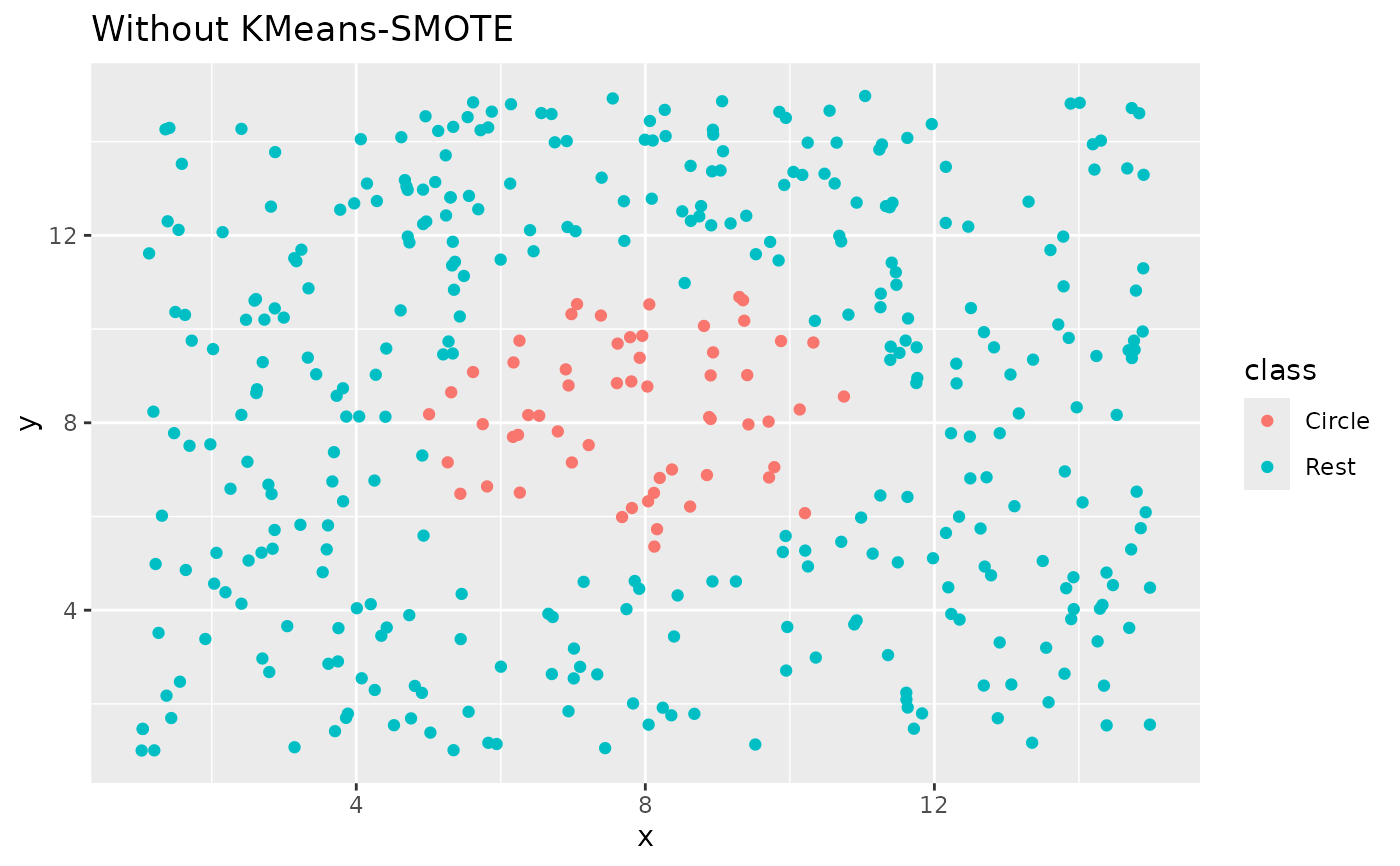
ggplot(circle_example, aes(x, y, color = class)) +
geom_point() +
labs(title = "Without KMeans-SMOTE")
 recipe(class ~ x + y, data = circle_example) |>
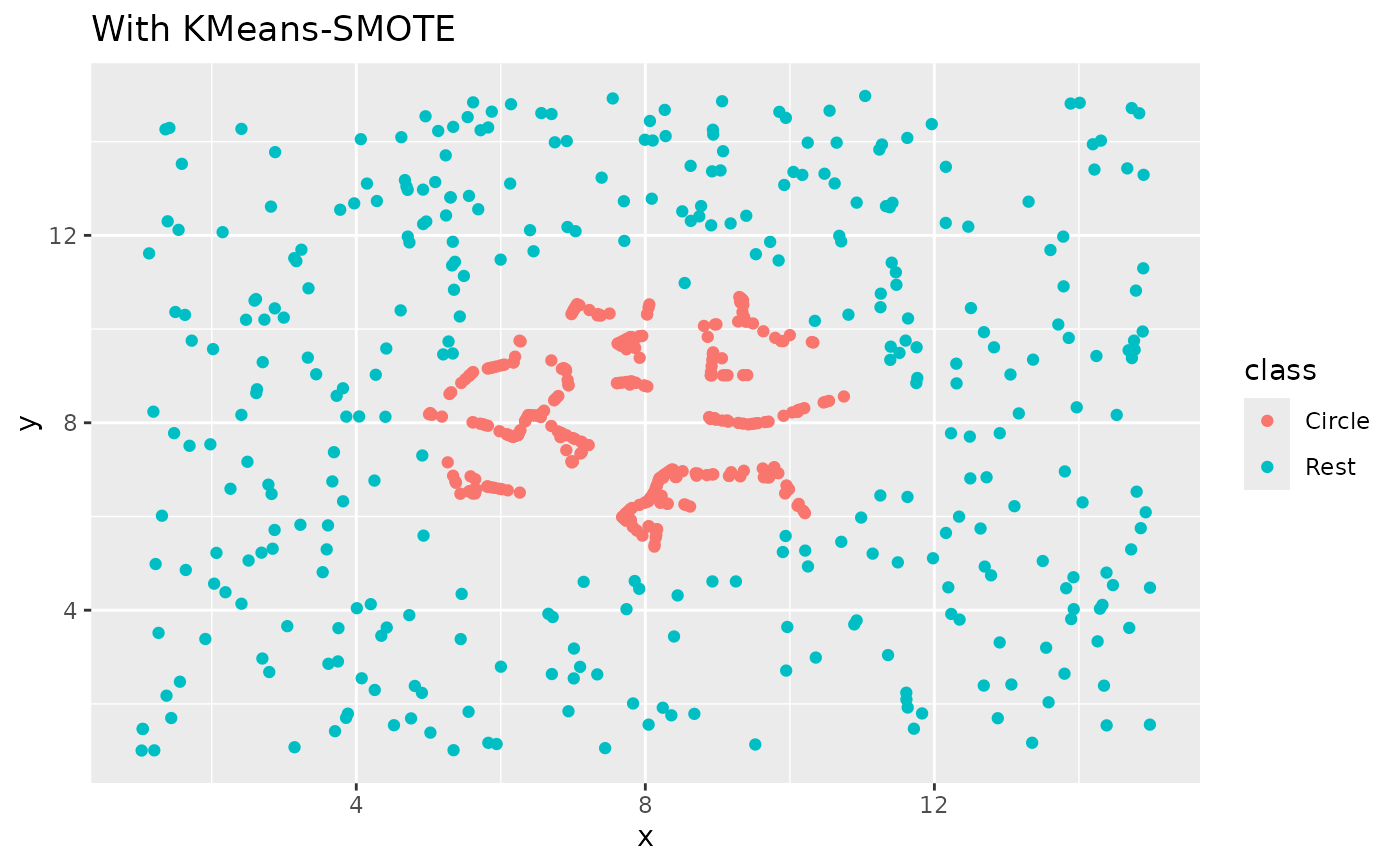
step_kmeans_smote(class) |>
prep() |>
bake(new_data = NULL) |>
ggplot(aes(x, y, color = class)) +
geom_point() +
labs(title = "With KMeans-SMOTE")
recipe(class ~ x + y, data = circle_example) |>
step_kmeans_smote(class) |>
prep() |>
bake(new_data = NULL) |>
ggplot(aes(x, y, color = class)) +
geom_point() +
labs(title = "With KMeans-SMOTE")